SQL Joins: INNER, LEFT, RIGHT, and FULL JOIN

Last published
Table of Contents
Relational data is often split across tables, but applications need it brought back together. SQL joins combine those rows: an INNER JOIN keeps matches, a LEFT JOIN or RIGHT JOIN preserves one side, and a FULL JOIN preserves both.
Join direction, duplicate rows, and filter placement can all change the result. We'll work through the four main join types, table aliases, multi-table joins, and the LEFT JOIN filtering mistake that removes unmatched rows.
This article covers the "Joins" chapter of Learn SQL, where you can run each join against a real database.
What Is a SQL Join?
Joins are one of the most important features that SQL offers. Joins allow us to make use of the relationships we have set up between our tables. In short, joins allow us to query multiple tables at the same time. Relational databases commonly split data across tables to avoid repetition — an employees table might store a department_id instead of copying the department's name into every employee record — which is one reason backend developers need SQL.
To perform a table join, we need to tell the database how to "match up" the rows from each table. The ON clause specifies the columns from each table that should be compared. Most SQL joins work this way, though a qualified join can use USING instead, and a CROSS JOIN combines every pair of rows without a join condition.
SELECT *
FROM employees
INNER JOIN departments
  ON employees.department_id = departments.id;
In this query:
employees.department_idrefers to thedepartment_idcolumn from theemployeestable.departments.idrefers to theidcolumn from thedepartmentstable.
The ON clause ensures that rows are matched based on these columns, creating a relationship between the two tables.
The join type decides what happens to rows that don't match.
| Join type | Rows returned |
|---|---|
INNER JOIN |
Only matching rows from both tables |
LEFT JOIN |
Every left row, plus matching right rows |
RIGHT JOIN |
Every right row, plus matching left rows |
FULL JOIN |
Every row from both tables |
INNER JOIN: Matching Rows
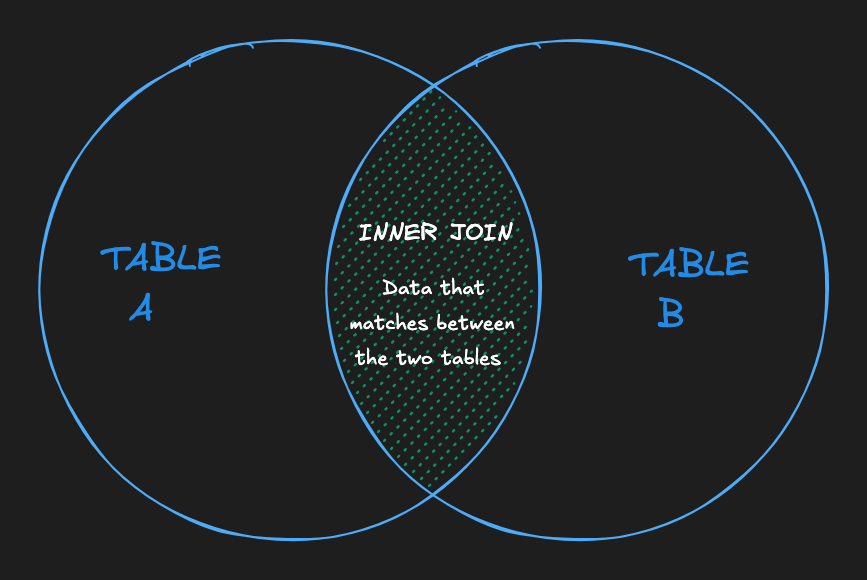
The simplest and most common type of join in SQL is the INNER JOIN. By default, a JOIN command is an INNER JOIN, but writing INNER JOIN makes the intent explicit. An INNER JOIN returns all of the records in table_a that have matching records in table_b as demonstrated by the following Venn diagram.
SELECT *
FROM employees
INNER JOIN departments
  ON employees.department_id = departments.id;
Employees without a department disappear. Departments with no employees also disappear. Use an inner join when the result only makes sense if both records exist.
The query above returns all the fields from both tables. The INNER keyword only affects the number of rows returned, not the number of columns. The INNER JOIN filters rows based on matching department_id and id, while the SELECT * ensures all columns from both tables are included. An explicit SELECT list is usually clearer and safer than SELECT *.
Table Aliases and Qualified Columns
When working with multiple tables, you can specify which table a field belongs to using a .. This is called a qualified column name. For example:
table_name.column_name
SELECT students.name, classes.name
FROM students
INNER JOIN classes ON classes.class_id = students.class_id;
The above query returns the name field from the students table and the name field from the classes table.
In many databases, different tables might share the same column names, such as id. If you don't specify the table name (or alias) for a column, the database won't know which column to use for the join. For example, writing ON id = id won't work because the database can't distinguish between the id columns in each table.
A small trick you can do to make writing the SQL query easier is to define an alias for each table. Here's an example:
SELECT e.name, d.name
FROM employees e
INNER JOIN departments d
  ON e.department_id = d.id;
Notice the simple alias declarations e and d for employees and departments, respectively. Some developers do this to make their queries less verbose. That said, I personally hate it because single-letter variables are harder to grok, so don't use them! Prefer short, recognizable words:
SELECT employee.name, department.name
FROM employees AS employee
INNER JOIN departments AS department
  ON employee.department_id = department.id;
Use an alias consistently after assigning it. PostgreSQL, MySQL, and SQLite all support AS for table aliases. Clear names help in code review and database integration tests.
How Does a LEFT JOIN Work?
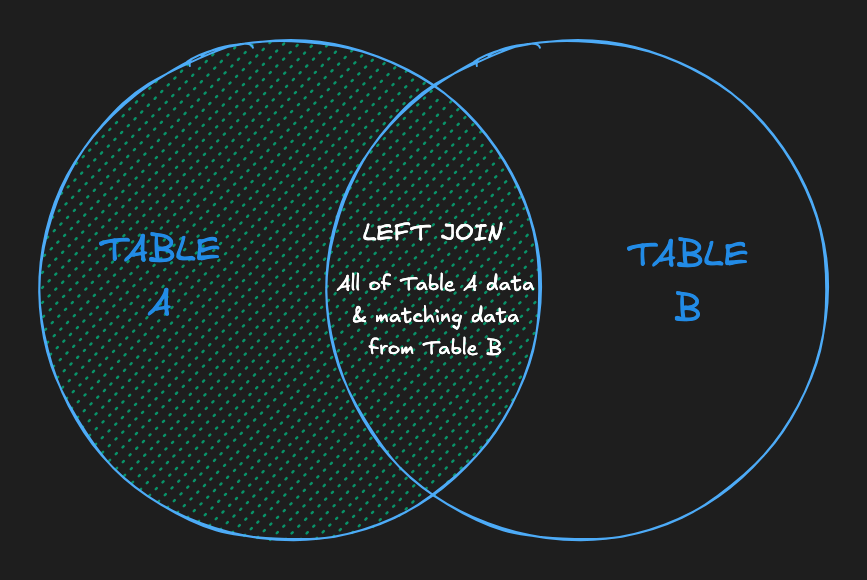
A LEFT JOIN will return every record from table_a regardless of whether or not any of those records have a match in table_b. A left join will also return any matching records from table_b. Here's a Venn diagram to help visualize the effect of a LEFT JOIN:
SELECT employees.name, departments.name
FROM employees
LEFT JOIN departments
  ON employees.department_id = departments.id;
This query includes employees who aren't assigned to a department. Their departments.name value is NULL. Left joins work well for reports that must keep every user, product, or account.
LEFT OUTER JOIN means the same thing as LEFT JOIN. The OUTER keyword is optional.
The LEFT JOIN WHERE trap
Filtering the right table in WHERE can remove the unmatched rows you meant to preserve:
SELECT employees.name, departments.name
FROM employees
LEFT JOIN departments
  ON employees.department_id = departments.id
WHERE departments.city = 'Boston';
For an employee with no department, departments.city is NULL. The WHERE condition isn't true, so the employee disappears. The result behaves like an inner join.
Put the condition in ON to control which right-side rows match while keeping every left-side row:
SELECT employees.name, departments.name
FROM employees
LEFT JOIN departments
  ON employees.department_id = departments.id
 AND departments.city = 'Boston';
Keep the condition in WHERE when you want to filter the completed result. To find employees with no department, test the right-side key with IS NULL:
SELECT employees.name
FROM employees
LEFT JOIN departments
  ON employees.department_id = departments.id
WHERE departments.id IS NULL;
RIGHT JOIN: Preserving Right-Side Rows
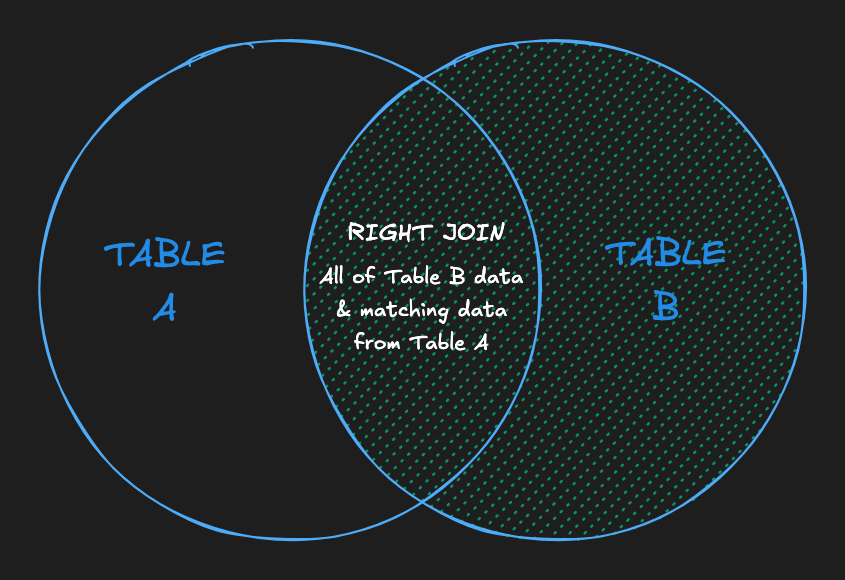
A RIGHT JOIN is, as you may expect, the opposite of a LEFT JOIN. It returns all records from table_b regardless of matches, and all matching records between the two tables.
SELECT employees.name, departments.name
FROM employees
RIGHT JOIN departments
  ON employees.department_id = departments.id;
A RIGHT JOIN is just a LEFT JOIN with the order of the tables switched... so mostly you should just not use them!
SELECT employees.name, departments.name
FROM departments
LEFT JOIN employees
  ON employees.department_id = departments.id;
PostgreSQL and MySQL support RIGHT JOIN, and SQLite added it in version 3.39.0. Swap the table order and use LEFT JOIN for older SQLite versions.
FULL JOIN: Preserving Both Sides
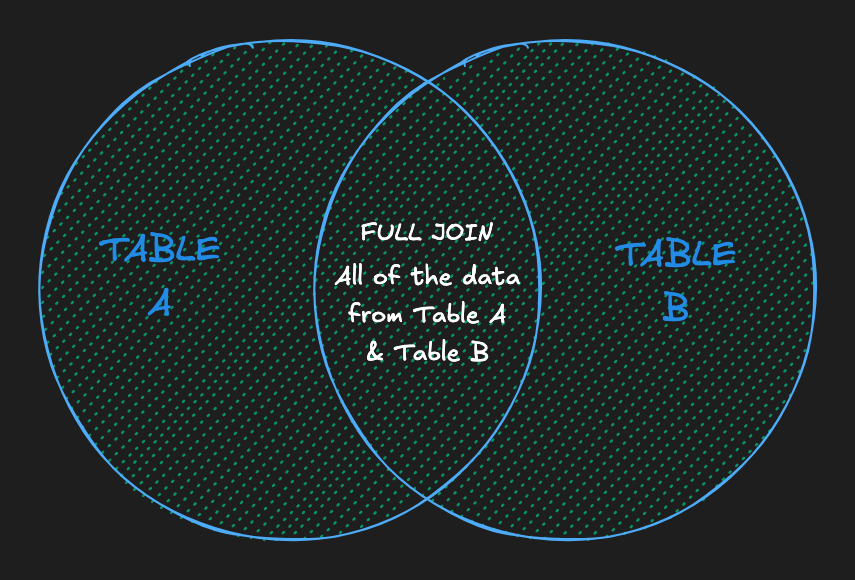
A FULL JOIN, also written FULL OUTER JOIN, combines the result set of the LEFT JOIN and RIGHT JOIN commands. It returns all records from both table_a and table_b regardless of whether or not they have matches.
SELECT employees.name, departments.name
FROM employees
FULL JOIN departments
  ON employees.department_id = departments.id;
This works for reconciliation: finding employees without a department and departments without any employees in one result. PostgreSQL supports FULL JOIN, and SQLite has supported it since version 3.39.0. MySQL doesn't support it directly. In MySQL and older SQLite versions, combine a left join with a second query for unmatched rows using UNION ALL.
Check your database's documentation instead of assuming every engine implements the same SQL. These differences matter during upgrades and database migrations.
Duplicate Rows in SQL Joins
Joins don't remove duplicates. They return one row for every matching pair.
If one department has three employees, joining that department to employees produces three rows. The department data repeats because the relationship is one-to-many. Repeated keys on both sides multiply further: two matching rows on the left and three on the right produce six rows.
Don't reach for DISTINCT automatically. It can hide an incorrect join condition and removes only rows identical across every selected expression. Instead:
- Confirm that the
ONcondition uses the intended keys. - Check whether the relationship is one-to-one, one-to-many, or many-to-many.
- Aggregate with
GROUP BYwhen you need one row per entity. - Enforce real uniqueness rules with primary keys or unique constraints.
Joining More Than Two Tables
To incorporate data from more than two tables, you can utilize multiple joins to execute more complex queries!
SELECT *
FROM employees
LEFT JOIN departments
  ON employees.department_id = departments.id
INNER JOIN regions
  ON departments.region_id = regions.id;
Join order and type both matter. The LEFT JOIN preserves employees without a department, but the INNER JOIN that follows drops them again: their departments.region_id is NULL, and NULL never matches a region. An employee only survives this query if their department exists and belongs to a region.
Qualify shared columns, select only the fields you need, and inspect the relationship cardinality before adding aggregates. Indexes on join keys can help large tables, but they can't fix incorrect logic. If you only need to test whether related rows exist, a subquery with EXISTS may express that intent more directly.
Frequently Asked Questions
What are the four main types of SQL joins?
The four main join types are INNER JOIN, LEFT JOIN, RIGHT JOIN, and FULL JOIN. They differ in whether they discard or preserve unmatched rows from either table.
What is the difference between INNER JOIN and LEFT JOIN?
INNER JOIN returns only rows that match in both tables. LEFT JOIN returns every row from the left table and fills right-side columns with NULL when no match exists.
When does a WHERE clause turn a LEFT JOIN into an INNER JOIN?
A null-rejecting WHERE condition on a right-side column, such as orders.status = 'paid', removes unmatched rows because those columns are NULL. Put that condition in the ON clause when you need to filter matches while preserving all left-side rows.
Why does a SQL join return duplicate rows?
A join returns one result row for every matching pair. One-to-many and many-to-many relationships therefore repeat values from one or both tables.
Do all databases support RIGHT JOIN and FULL JOIN?
No. PostgreSQL and SQLite 3.39.0 or newer support both. MySQL supports RIGHT JOIN but not FULL JOIN, and older SQLite versions support neither directly. Equivalent queries can be written with LEFT JOIN and set operations.